
Audit Readiness Gap: What Auditors Ask vs. Disconnected System Outputs
Audits are no longer just about verifying compliance they evaluate how effectively an organization manages its processes, documents and quality records.
As internal audits become more strategic, organizations are expected to demonstrate not only compliance but also operational control and continuous improvement. In fact, 32% of Chief Audit Executives (CAEs) now oversee Enterprise Risk Management (ERM), highlighting the expanding role of internal audit beyond compliance.
The challenge isn’t a lack of information. Most organizations already have the required evidence, but it’s scattered across spreadsheets, emails, shared drives and disconnected systems. As a result, quality teams spend valuable time searching for records instead of preparing for the audit.
This creates the audit readiness gap the difference between what auditors expect and what organizations can quickly produce. Closing this gap requires a connected approach that centralizes quality information, standardizes audit workflows and keeps audit evidence accurate, accessible and traceable.
In this guide, you’ll learn what audit readiness is, why organizations struggle to stay audit-ready and how an audit management system helps close the audit readiness gap.
Why Many Organizations Struggle with Audit Readiness
Despite having established quality processes, many organizations still find audit preparation stressful and time-consuming. The problem isn’t usually a lack of compliance it’s the difficulty of gathering accurate evidence from disconnected systems within limited timeframes.
Here are some of the most common challenges.
1. Documents Are Stored Across Multiple Systems
Quality documents are often spread across shared drives, email attachments, local folders and different software applications. As a result, teams spend valuable time searching for the latest approved versions instead of preparing for the audit itself.
Without centralized document control, there’s also a greater risk of presenting outdated or inconsistent information to auditors.
2. Manual Evidence Collection
Preparing for an audit often involves collecting records from multiple departments, including production, quality, maintenance, HR and procurement.
When this process relies on emails, spreadsheets and manual follow-ups, it becomes slow, error-prone and difficult to manage. Missing records or incomplete documentation can delay audits and increase the risk of non-conformities.
3. Inconsistent Version Control
One of the most common audit observations involves outdated documents being used on the shop floor. Without proper version control, employees may unknowingly follow obsolete Standard Operating Procedures (SOPs), inspection checklists or work instructions, leading to process inconsistencies and compliance risks.
4. Missing Audit Trails
Auditors don’t just verify what happened they also want to know when, why and who performed each activity. Organizations using manual systems often struggle to provide complete audit trails for:
- Document approvals
- Process changes
- CAPA activities
- Employee training
- Quality inspections
Without reliable traceability, demonstrating compliance becomes significantly more difficult.
5. Delayed Corrective Actions
Identifying non-conformities is only part of the audit process. Auditors also expect organizations to demonstrate that corrective actions have been implemented, monitored and verified.
When CAPAs are tracked through emails or spreadsheets, deadlines are frequently missed and effectiveness checks are overlooked, increasing the likelihood of repeat audit findings.
6. Limited Cross-Department Visibility
Audit evidence is rarely owned by a single department. Information may come from quality, production, maintenance, procurement, warehouse operations and HR.
When each department maintains its own records independently, compiling complete audit evidence becomes time-consuming and inefficient. The lack of centralized visibility also makes it difficult to identify gaps before the audit begins.
Business Risks of Poor Audit Readiness
Poor audit readiness affects far more than the outcome of a single audit. When quality records are incomplete, documentation is difficult to locate or corrective actions remain unresolved, organizations face increased operational, financial and compliance risks.
Some of the most significant business impacts include:
1. Increased Risk of Non-Conformities
When organizations cannot provide complete or accurate evidence during an audit, auditors may raise minor or major non-conformities. These findings often require additional investigations, corrective actions and follow-up audits, consuming valuable time and resources.
2. Delayed Certifications and Regulatory Approvals
Missing documentation or unresolved audit findings can delay ISO certifications, customer approvals and regulatory compliance activities. For organizations operating in highly regulated industries, these delays can directly affect production schedules and business opportunities.
3. Higher Audit Preparation Costs
Without a centralized internal audit management system, quality teams often spend days collecting documents, verifying records and coordinating with multiple departments before every audit. This manual effort increases administrative costs while reducing the time available for quality improvement initiatives.
4. Operational Disruptions
Last-minute audit preparation frequently interrupts normal business operations. Employees are pulled away from their daily responsibilities to locate documents, respond to auditor requests and validate information, affecting both productivity and efficiency.
5. Reduced Customer Confidence
Customers expect suppliers to demonstrate consistent quality and compliance. Repeated audit findings, delayed responses or incomplete documentation can reduce customer confidence and make it more difficult to secure new contracts or retain existing business.
6. Missed Opportunities for Continuous Improvement
Audits should not only identify compliance gaps they should also highlight opportunities to improve processes and reduce risks. When organizations focus solely on gathering evidence at the last minute, they miss valuable insights that could strengthen long-term operational performance.
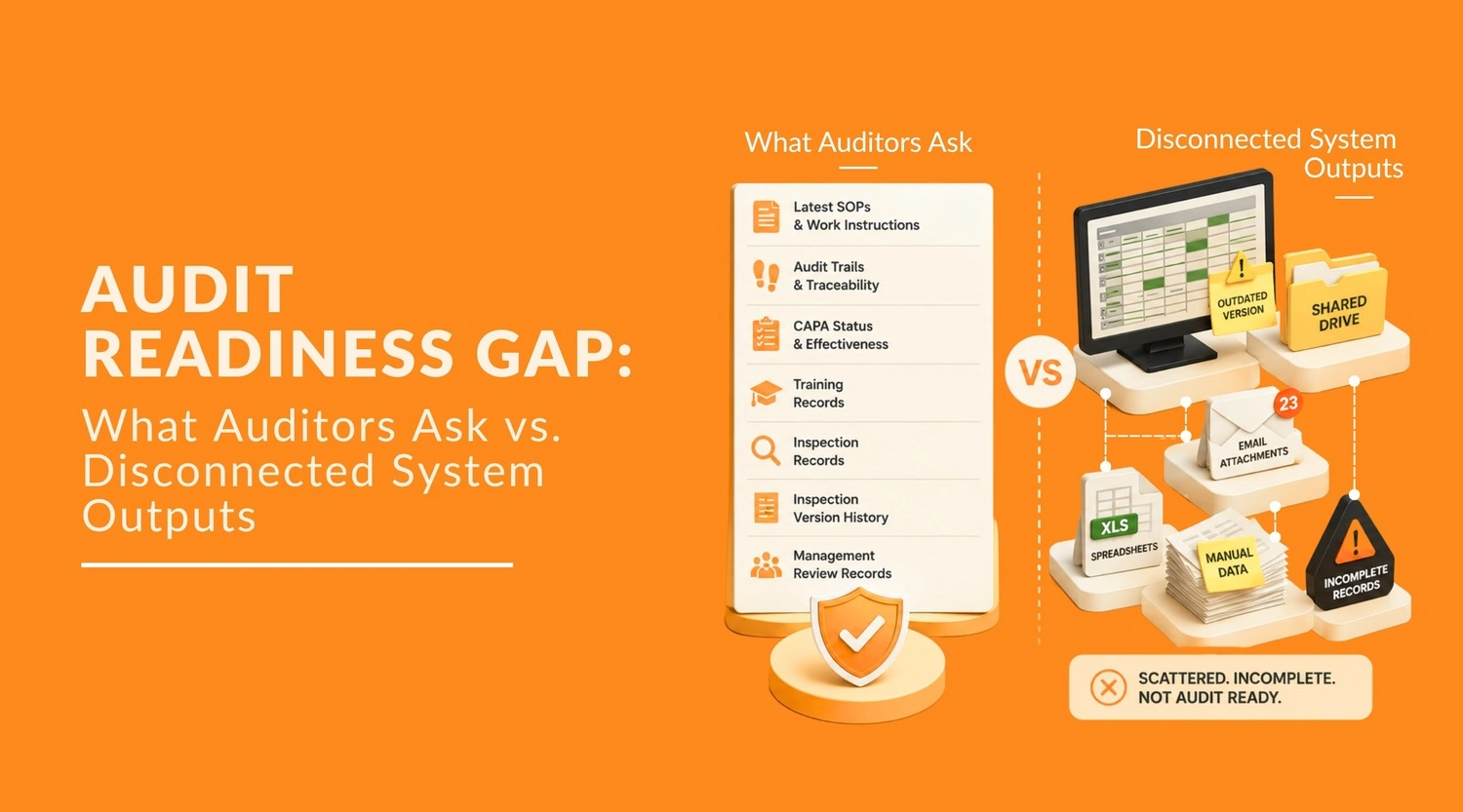
The Audit Readiness Gap: What Auditors Ask vs. What Disconnected Systems Deliver
During an audit, the challenge is rarely whether information exists it’s whether the organization can retrieve accurate, complete and traceable evidence quickly.
Auditors expect records that demonstrate compliance, consistency and accountability. However, organizations relying on spreadsheets, emails and disconnected systems often struggle to provide this evidence without significant manual effort.
The result is an audit readiness gap the difference between auditor expectations and the organization’s ability to produce reliable information.
| What Auditors Ask For | What Disconnected Systems Often Deliver |
|---|---|
| Latest approved SOPs and work instructions | Multiple document versions stored in different locations |
| CAPA status and effectiveness records | Spreadsheets with incomplete or outdated updates |
| Employee training records | Emails, paper files or missing certificates |
| Complete audit trail | Inconsistent or missing activity history |
| Customer complaint history | Information scattered across multiple systems |
| Supplier qualification records | Separate folders, spreadsheets and shared drives |
| Document revision history | Unclear version ownership and approval status |
| Evidence of corrective actions | Missing attachments, approvals or verification records |
These gaps don’t necessarily indicate poor quality practices they often highlight disconnected processes and fragmented information management. As organizations grow, relying on manual systems makes it increasingly difficult to maintain consistent audit readiness across departments.
Closing this gap requires more than organizing documents before an audit. It requires connected processes, standardized workflows and a centralized audit management system that keeps quality records audit-ready every day not just when an audit is scheduled.
How an Audit Management System Closes the Audit Readiness Gap
A modern audit management system helps organizations move beyond manual preparation by ensuring audit evidence is continuously updated, easily accessible and fully traceable. Instead of spending valuable time searching for information, quality teams can focus on improving processes and addressing risks before they become audit findings.
Here’s how an audit management software helps close the audit readiness gap.
1. Centralize Audit Documentation
One of the biggest challenges during audits is locating the right documents quickly. When procedures, work instructions, audit reports and quality records are stored across multiple systems, preparing for an audit becomes slow and error-prone.
An audit management system software centralizes audit documents and quality records in a secure repository with version control and role-based access. Inspection records, approvals, test reports and other quality evidence remain organized, searchable and readily available, enabling teams to respond to auditor requests quickly and confidently.
Benefits include:
- Single source of truth for audit records
- Faster document retrieval
- Improved version control
- Better traceability
- Reduced documentation errors
With Pyraman’s Audit Management System, organizations can centralize audit documents in a secure, version-controlled repository, ensuring teams always have instant access to the latest approved records during audits.
2. Standardize Audit Planning and Scheduling
Managing audits manually often leads to missed schedules, inconsistent audit planning and delayed follow-ups.
An internal audit management system automates audit scheduling, assigns auditors, tracks timelines and sends reminders for upcoming activities. Standardized workflows ensure every audit follows a consistent process regardless of department or location.
This helps organizations:
- Plan audits proactively
- Eliminate scheduling conflicts
- Improve audit consistency
- Ensure timely audit execution
- Increase accountability across teams
Using Pyraman’s Audit Management System, organizations can automate audit planning, assign responsibilities and track schedules from a single platform, helping ensure every audit is completed on time.
3. Automate Audit Checklists and Workflows
Paper-based checklists and manual approvals make audits slower and increase the risk of missing critical information. Audit workflow software digitizes audit checklists, automatically assigns tasks and guides auditors through standardized procedures. This improves data accuracy while reducing administrative effort.
With digital audit workflows, organizations can:
- Complete audits faster
- Standardize inspection criteria
- Reduce manual paperwork
- Improve audit accuracy
- Capture findings instantly
The platform digitizes audit checklists and approval workflows, enabling quality teams to perform audits consistently while reducing manual effort and paperwork.
4. Manage Findings and Non-Conformances Efficiently
Recording audit findings is only the beginning. Organizations also need a structured process to investigate non-conformances, assign responsibilities and verify corrective actions.
An integrated audit compliance software links audit findings directly with non-conformance management, ensuring every issue is tracked until closure. This prevents unresolved findings from carrying over into future audits.
Key advantages include:
- Faster investigation of findings
- Automated ownership and notifications
- Better visibility into open issues
- Reduced repeat audit observations
- Improved compliance management
Pyraman seamlessly connects audit findings with NC (Non-Conformance) Management, Complaint Management and CAPA, ensuring every issue is investigated, assigned and tracked through to closure. By linking customer complaints directly with corrective actions and audit records, organizations can quickly demonstrate how issues were identified, resolved and prevented from recurring during audits.
5. Track CAPA from Assignment to Closure
Corrective actions are among the first records auditor’s request. Missing deadlines or incomplete effectiveness checks often result in repeat findings.
An integrated audit management platform connects CAPA with audit findings, enabling organizations to assign actions, monitor progress and verify effectiveness from a single system.
A connected CAPA process enables teams to:
- Assign responsibilities automatically
- Monitor action status in real time
- Verify implementation before closure
- Eliminate recurring audit findings
- Strengthen continuous improvement efforts
The integrated eQMS connects CAPA management with audit workflows, providing complete visibility into corrective actions from assignment through effectiveness verification.
6. Maintain Complete Audit Trails
Auditors need more than documents they need proof of who performed each activity, when it occurred and what changes were made.
Auditors also verify employee competency and training records to ensure personnel are qualified for their assigned responsibilities. Pyraman’s Training Management module centralizes training records, competency assessments and completion history, making it easy to demonstrate compliance during internal and external audits.
Complete audit trails help organizations:
- Improve transparency
- Demonstrate regulatory compliance
- Simplify external audits
- Strengthen document traceability
- Reduce manual record keeping
Pyraman automatically captures approvals, document revisions and workflow history, creating a complete audit trail that supports compliance and simplifies external audits.
7. Monitor Audit Performance with Real-Time Dashboards
Without real-time visibility, organizations often discover audit issues only after they have become major findings.
Modern audit management software provides interactive dashboards that track audit schedules, findings, CAPA status, overdue actions and compliance trends from a single platform.
Track important audit metrics such as:
- Completed vs. planned audits
- Open audit findings
- CAPA completion status
- Overdue corrective actions
- Audit compliance trends
- Department-wise audit performance
These insights help management identify risks early and make informed decisions to strengthen audit readiness.
Pyraman provides interactive dashboards that give quality teams real-time visibility into audit performance, open findings, CAPA status and compliance trends.
8. Generate Audit-Ready Reports in Minutes
Preparing audit reports manually often requires collecting data from multiple systems and formatting it into a consistent structure.
An internal audit management solution automatically compiles audit findings, corrective actions, compliance status and supporting evidence into standardized reports. This reduces preparation time while ensuring auditors receive complete and accurate information.
Automated reporting enables organizations to:
- Reduce audit preparation time
- Generate consistent reports
- Improve reporting accuracy
- Present evidence confidently
- Stay audit-ready throughout the year
With automated reporting in Pyraman, organizations can generate audit-ready reports with supporting evidence, helping quality teams respond to auditor requests quickly and confidently.
Audit Readiness Checklist
Use the checklist below to evaluate whether your organization is prepared for its next audit.
- Latest SOPs, policies and work instructions are approved and accessible
- Document revisions are controlled and up to date
- Internal audits are completed as planned
- CAPAs are implemented, verified and closed
- Employee training records are complete and current
- Supplier qualification and audit records are available
- Customer complaints have been investigated and resolved
- Audit trails are complete and traceable
- Previous audit findings have been addressed
- Quality records can be retrieved quickly during an audit
If multiple items remain unchecked, your organization may benefit from conducting an audit readiness assessment before the next internal, customer or certification audit.
Strengthen Your Audit Readiness with Pyraman
Pyraman’s Audit Management System helps organizations centralize audit documentation, automate workflows and maintain complete traceability, making every audit faster, simpler and more efficient.
With Pyraman, organizations can:
- Plan, schedule and manage audits from a centralized platform
- Standardize audit checklists and workflows
- Record findings and manage non-conformances efficiently
- Track CAPAs from assignment through effectiveness verification
- Maintain complete document control and audit trails
- Monitor audit performance with real-time dashboards
- Generate audit-ready reports with supporting evidence
- Strengthen collaboration across quality, production and compliance teams
By replacing disconnected systems with a connected audit management system, organizations can reduce audit preparation time, strengthen compliance and stay continuously audit-ready.
Ready to simplify your next audit?
Book a free demo to see how Pyraman helps your organization streamline audit management, improve compliance and build a more efficient, audit-ready quality system.
Frequently Asked Questions (FAQs)
1. Can audit management software help during ISO certification audits?
Yes. Audit management software helps organizations prepare for ISO certification audits by organizing documentation, tracking CAPAs, maintaining audit trails and providing quick access to objective evidence required by auditors.
2. How do I know if my organization is audit-ready?
If your team can quickly access approved documents, audit trails, CAPA records, training records and quality data without manual searching, your organization is likely audit-ready.
3. How long does it take to prepare for an audit with audit management software?
With an audit management system, organizations can significantly reduce audit preparation time by centralizing documents, automating workflows and maintaining audit-ready records. Instead of spending days or weeks collecting evidence, quality teams can quickly retrieve the required information and prepare for audits more efficiently.
4. What evidence do ISO auditors usually ask for?
ISO auditors typically request objective evidence to verify that your management system is implemented and operating effectively. Common examples include:
- Approved policies, SOPs and work instructions
- Internal audit reports
- CAPA (Corrective and Preventive Action) records
- Employee training and competency records
- Inspection and quality control records
- Document revision history and approvals
- Management review meeting records
- Customer complaints and resolution records
- Supplier evaluation and performance records
- Risk assessments and improvement actions
Having these records organized and easily accessible through an audit management system helps organizations respond to auditor requests quickly and demonstrate compliance with confidence.
5. How does audit management software improve audit readiness?
Audit management software centralizes audit documentation, automates workflows, tracks corrective actions, maintains audit trails and provides real-time visibility into audit activities, making organizations continuously audit-ready.
6. What features should the best audit management software include?
The best audit management software should include:
- Audit planning and scheduling
- Digital audit checklists
- CAPA integration
- Document control
- Automated notifications
- Audit trails
- Dashboard reporting
- Compliance tracking
7. What causes organizations to fail audits?
Common reasons include:
- Incomplete documentation
- Outdated procedures
- Missing audit evidence
- Unresolved CAPAs
- Poor document control
- Lack of employee training
- Weak record traceability

Start Your Free 30-Day eQMS Trial
Get full access to Pyraman eQMS for 30 days, free. No commitment, just hands-on document control, audits, and compliance management.
